
How to Pay with Kakao Pay on iPhone
How to pay in stores with Kakao Pay on iPhone. Covers opening the payment barcode or QR in KakaoTalk, how it differs from Apple Pay, why the transit card doesn't work on iPhone and what to use instead, the Pay Money Card, and adding your membership to Apple Wallet.
Table of Contents
💡 On iPhone, you pay with Kakao Pay using a barcode or QR code. Open the payment barcode in KakaoTalk or the Kakao Pay app and show it to the staff. Holding your iPhone near the card reader to pay is Apple Pay.
⚠️ Kakao Pay’s mobile transit card doesn’t work on iPhone. Kakao Pay explains that iPhone NFC use is restricted in Korea, so iPhone users can’t easily get the transit card.
ℹ️ The screenshots are from Korean KakaoTalk. Menu names are written in Korean with their meaning in parentheses.
🔍 How is Kakao Pay different from Apple Pay?
| Item | Kakao Pay (iPhone) | Apple Pay |
|---|---|---|
| Paying | Show a barcode or QR code, or scan the store’s QR code | Hold your iPhone near the card reader |
| Money | Kakao Pay Money, Pay gift cards, Pay Points, registered credit or check cards | Hyundai Card or KakaoBank cards in Wallet |
| Open | KakaoTalk More → Pay, or the Kakao Pay app | Double-click the side button on your iPhone |
| Transit | ❌ No mobile transit card on iPhone | ✅ With T-money in Wallet |
❓ Can I add Kakao Pay to Apple Pay?
Not as a payment card. As of November 2026, only Hyundai Card and KakaoBank support Apple Pay in Korea. You can’t add Kakao Pay Money or the Pay Money Card to Apple Wallet to tap on readers.
- If you have a KakaoBank check card, you can add it to Apple Pay → How to Add a KakaoBank Card to Apple Pay
You can, however, add your Kakao Pay membership to Apple Wallet.
- In the Kakao Pay app, tap 결제하기 (Pay) → 멤버십 (Membership) → 애플월렛 추가 (Add to Apple Wallet).
- A membership pass is added to Wallet. When you pay with Apple Pay, show the barcode at the bottom of the pass to earn points.
📲 Pay in stores with Kakao Pay on iPhone
Set up a payment method
First, link the money you’ll pay with. You only need to do this once.
- Kakao Pay Money: KakaoTalk 더보기(∙∙∙) → pay → 설정 → 머니 관리 → 연결계좌 (More → pay → Settings → Money management → Linked account)
- Credit or check card: KakaoTalk 더보기(∙∙∙) → pay → 설정 → 결제 관리 → 결제 수단 → 등록하기 (More → pay → Settings → Payment management → Payment methods → Register)
Open Pay from More in KakaoTalk
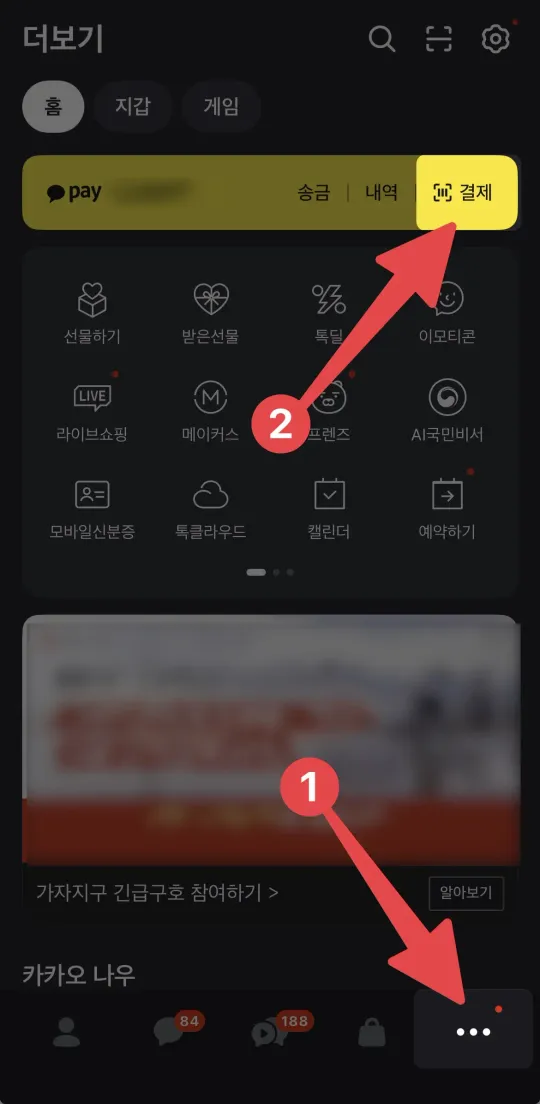
Tap ① 더보기 (More, ∙∙∙) at the bottom of KakaoTalk, then tap ② 결제 (Pay) in the pay bar at the top. You can also open it in the Kakao Pay app.
Choose a payment method and show the barcode
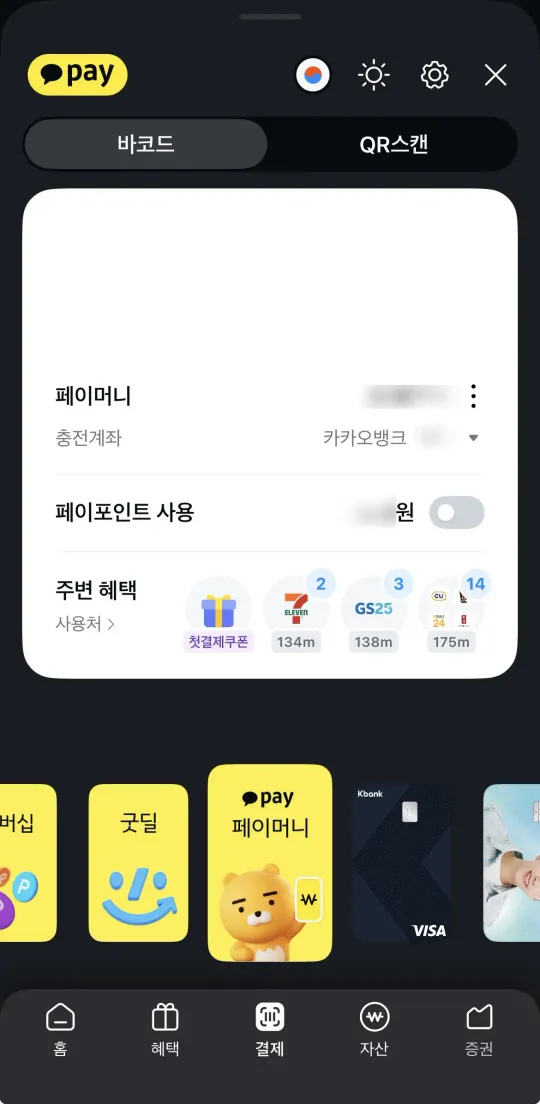
The payment barcode appears on the 바코드 (Barcode) tab at the top. Swipe the card list at the bottom to choose 페이머니 (Pay Money) or a registered card, then show the screen to the staff. They scan it to complete the payment.
- If you have Pay Points, turn on 페이포인트 사용 (Use Pay Points) to use them too.
- If the store displays a Kakao Pay QR code, tap the QR스캔 (QR scan) tab at the top and scan the QR code yourself to pay.
⚡ Faster ways to open it
- Shake: Shake your phone twice to show the payment barcode. Turn it on in KakaoTalk 더보기(∙∙∙) → 결제 → 설정 → 흔들기 설정 (More → Pay → Settings → Shake settings).
- Widget: Put the Kakao Pay app widget on your Home Screen to pay with QR or barcode right away.
- Smartwatch: Install Kakao Pay on your smartwatch to pay quickly.
🗺️ Nearby stores
Find stores that accept Kakao Pay in KakaoTalk 더보기(∙∙∙) → 결제 → 내 주변 (More → Pay → Nearby).
🚌 Kakao Pay’s transit card doesn’t work on iPhone
Kakao Pay’s mobile transit card works only on Android. Kakao Pay also says its K-Pass is an NFC service (you hold your phone near the reader), so it’s hard to use on iPhone.
To ride buses and subways with an iPhone, use one of these:
| Option | Details |
|---|---|
| T-money in Apple Wallet | Create prepaid T-money in Wallet and top it up with a KakaoBank card or Hyundai Card in Apple Pay, or with Kakao Pay in the Mobile T-money app → Learn more |
| Pay Money Card (transit type) | A physical Kakao Pay card with a transit function. See below |
💳 What is the Kakao Pay card (Pay Money Card)?
The Pay Money Card is a physical card linked to the account or card registered in Kakao Pay. You can use it online and offline at BC Card merchants in Korea.
🚌 Transit and non-transit types
- There are transit and non-transit types. The transit type is delivered 3–5 business days after you apply, and the non-transit type 7–14 days after.
- The transit type is loaded with a ₩10,000 transit deposit when issued. After that, the transit fares you use are refilled automatically from Kakao Pay Money every day.
⚠️ Things to note
- It’s domestic-only, so it can’t be used abroad.
- It can’t be added to Apple Pay. Tap the physical card on the reader.
⚙️ Card menu
KakaoTalk 더보기(∙∙∙) → pay → 전체 → 소비 → 페이카드 → 페이머니카드 (More → pay → All → Spending → Pay Card → Pay Money Card)
🙋 Frequently asked questions
Can I pay with Kakao Pay on iPhone?
Yes. Show the payment barcode or QR code to the staff, or scan the store’s Kakao Pay QR code. Paying by holding your phone near a reader (Samsung Pay link, overseas Tap&go) works only on Samsung or Android phones.
Is there a payment limit?
Kakao Pay Money can pay up to ₩2 million per payment, and cards up to your card limit. Some stores may have different limits.
Can minors use it?
Users aged 14 to under 19 can use offline payments. Payments aren’t allowed at businesses that are off-limits to minors.
Do I get a cash receipt?
When you pay in a store with Kakao Pay Money, a prepaid electronic receipt is issued in your name. Like a cash receipt, you can use it for income deductions or expense records.
How do I cancel a payment?
Open KakaoTalk 더보기(∙∙∙) → 결제 → 결제내역 → 결제취소 바코드 (More → Pay → Payment history → Cancel barcode) and show it to the staff.
Can I use it abroad?
Yes, in countries and stores that accept Kakao Pay QR or barcode payments. Overseas offline payments must be made with Kakao Pay Money, not a card.
Who do I contact?
The Kakao Pay customer center is 1644-7405 (charged, weekdays 09:00–18:00). For the Pay Money Card, call 1670-0223 (charged, weekdays 09:00–18:00).
🔗 Sources (in Korean): Kakao Pay customer center help (offline payment, mobile transit card, membership, Pay Money Card), Kakao Pay phone support, Apple’s participating issuers · Checked November 22, 2026